
You use ChatGPT. You open a new tab, write a prompt, copy the result, switch back to Gmail, paste it in, fix the greeting, adjust the tone, and finally send. That's not fast. That's just a different kind of work.
Plenty of professionals have started using ChatGPT for email drafts, and it does help. But if email is a big part of your day, the back-and-forth between tabs adds up quickly.
Foresty takes a different approach. It's a Chrome extension that lives inside Gmail and Outlook. You draft, reply, improve, and send, all without ever leaving your inbox.
This article gives you a complete, side-by-side comparison of both tools: what they do well, where they fall short, and which one is worth your time depending on how you work.
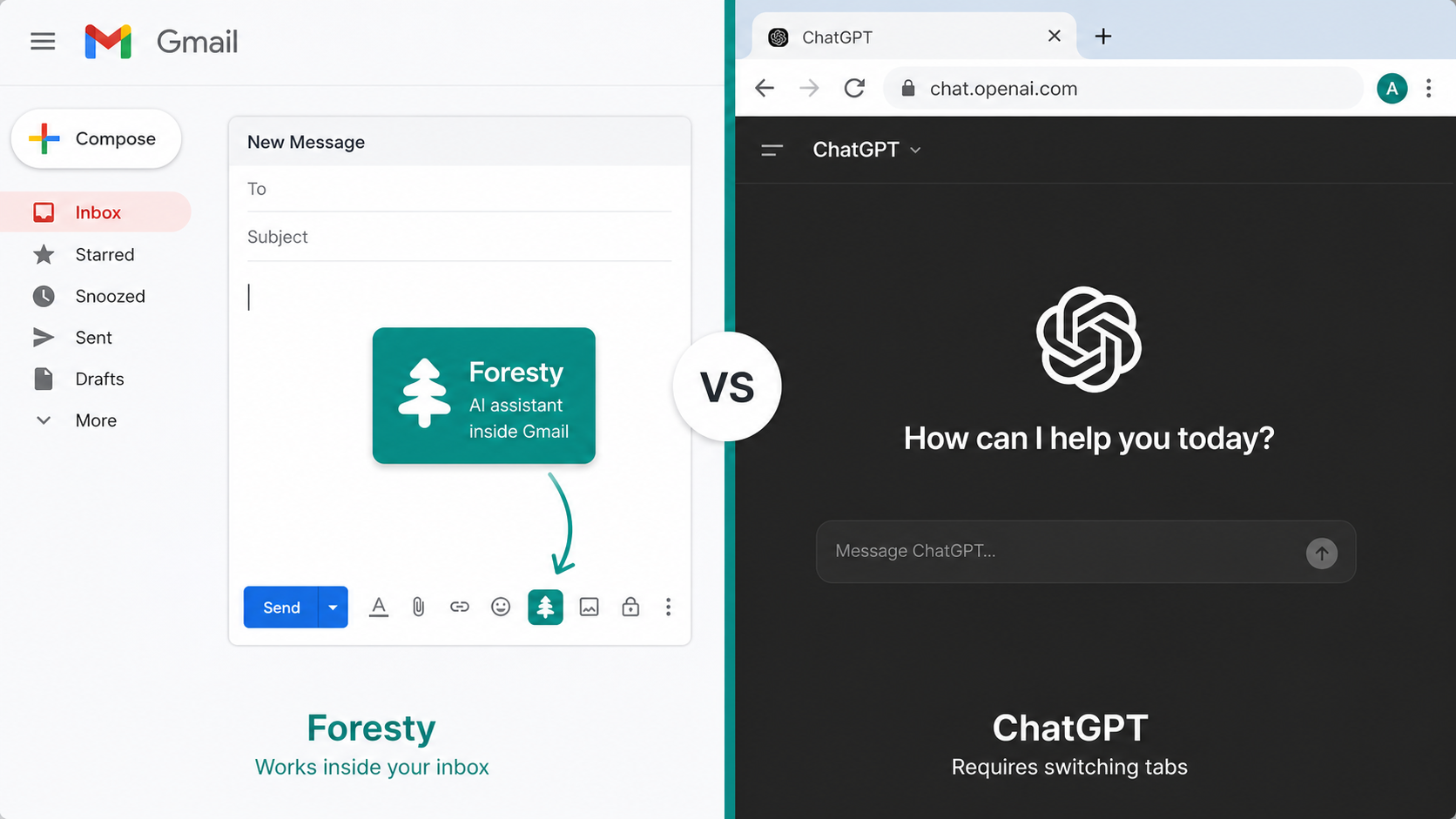
Quick Comparison: Foresty vs ChatGPT at a Glance
| Feature | Foresty | ChatGPT |
|---|---|---|
| Works inside Gmail | Yes | No |
| Works inside Outlook | Yes | No |
| Tab switching required | No | Yes |
| Email context awareness | Reads your thread | You must paste manually |
| AI reply generation | 30–60 seconds | ! 5–10 minutes (with copy/paste) |
| Email draft generation | 2–3 minutes | ! 10–15 minutes |
| Smart autocomplete | Yes | No |
| Subject line generator | Yes | ! Only with prompting |
| Voice input | Yes | Yes |
| Grammar & tone improvement | Inline | ! Requires copy/paste |
| Free plan | Yes | Yes |
| Paid plan starts at | $8.08/month (annual) | $20/month |
What Is Foresty?
Foresty is a Chrome extension built specifically for email writing. It integrates directly inside Gmail and Outlook, so everything happens where you already work.
You type a quick idea, "follow up on last week's proposal, keep it short and friendly", and Foresty turns it into a ready-to-send email in seconds. No new tabs. No copy-pasting. No reformatting.
What Foresty Is Built to Do
Foresty focuses on one thing: helping you write better emails faster. Its core features include:
- Email draft generation, turn a rough prompt into a polished email
- AI reply generator, understand the context of a thread and write a fitting response
- Grammar and writing improvement, fix awkward sentences and adjust tone inline
- Smart subject line generator, create professional subject lines that match your email content
- Smart autocomplete, finish your sentences as you type, adapting to your style
- Voice assistant, dictate your email hands-free
- Inline editing, make quick changes without ever leaving the compose window
The AI reply generator is especially useful for people handling high email volumes, like customer success managers, recruiters, or sales teams.
What Is ChatGPT?
ChatGPT is a general-purpose AI assistant. It can help you write, research, summarise, code, brainstorm, and yes, it can write emails. For many people, it's already a go-to tool for drafting messages quickly.
How People Use ChatGPT for Email Writing
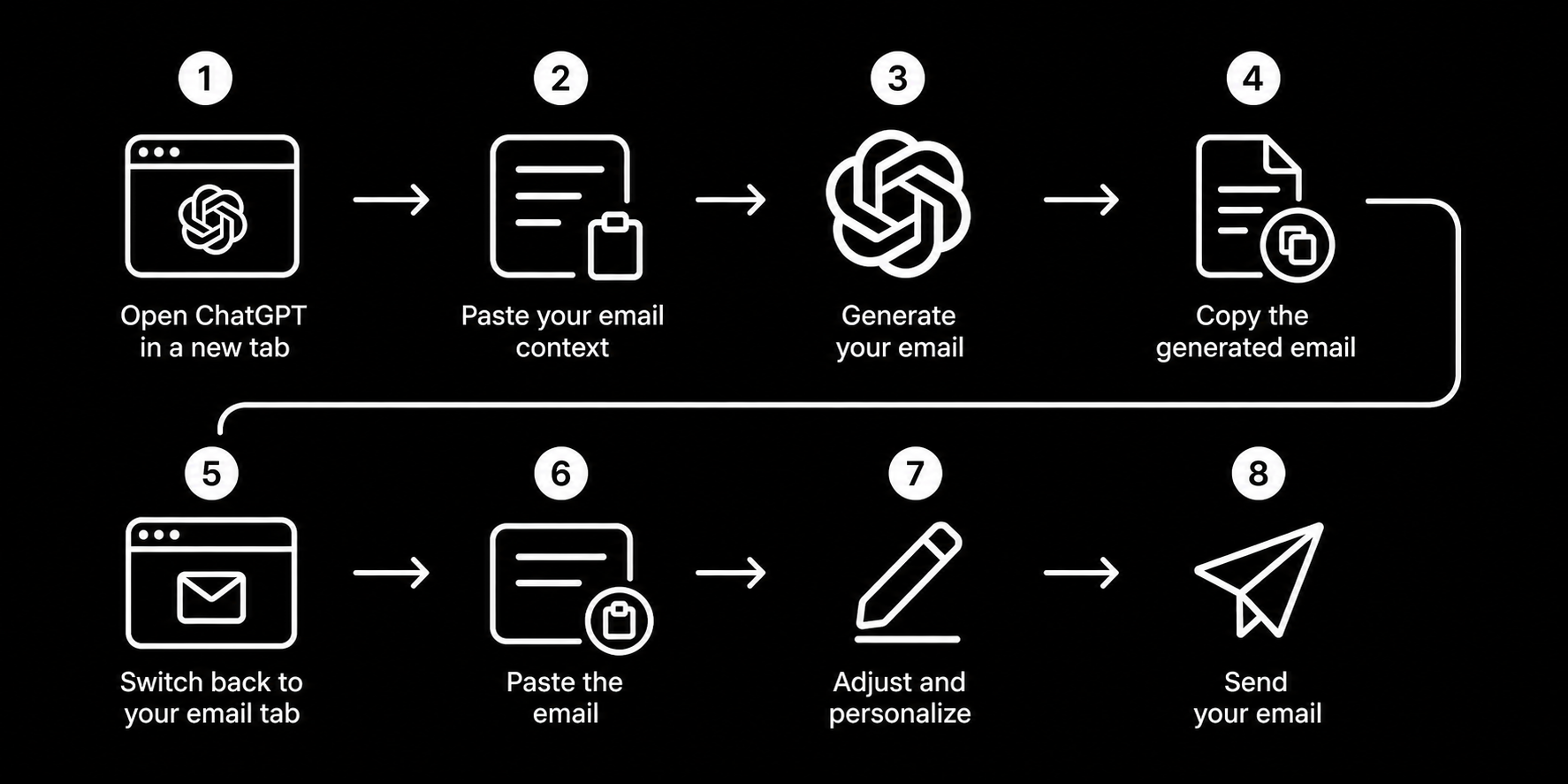
A typical workflow looks like this:
- Open ChatGPT in a separate tab
- Paste the email you received (or describe your situation)
- Write a prompt like "reply professionally, decline the meeting politely"
- Copy the generated text
- Switch back to Gmail or Outlook
- Paste and adjust the email
- Send
That's at least 5 to 7 manual steps per email. For one email a day, it's manageable. For ten, it becomes a drag.
Where ChatGPT Falls Short for Email
ChatGPT doesn't know what's in your inbox. You have to tell it everything, the context, the tone you want, who you're writing to. It can't read your thread and respond to it automatically.
It also doesn't live inside Gmail or Outlook. Every email becomes a task that pulls you away from your inbox.
For general writing or brainstorming, ChatGPT is excellent. For fast, context-aware email replies, it creates more steps than it removes.
The Core Difference: Built for Email vs Built for Everything
This is the clearest way to understand the comparison.
ChatGPT is a general AI assistant that happens to be good at writing emails. Foresty is an email writing tool, full stop.
That difference shapes everything, where it lives, how fast it works, how much effort you put in, and how many steps stand between you and a sent message.
If you're writing blog posts, generating code, answering research questions, and also writing a few emails, ChatGPT is a reasonable choice for all of it.
If a significant chunk of your day is spent inside Gmail or Outlook handling messages, Foresty cuts that time down without adding a single extra step to your routine.
Feature-by-Feature Comparison
Drafting Emails From Scratch
With Foresty, you open Gmail, click compose, type a brief description of what you want to say, and the draft appears inside the compose window. From there, you can adjust or send.
With ChatGPT, you leave Gmail, open a new tab, write a detailed prompt with context, copy the result, come back, paste it, and fix any formatting issues.
Both produce a decent draft. The difference is in how long it takes and how much thinking you have to do upfront.
Generating Replies
This is where Foresty has the clearest edge. Because the AI reply generator reads the thread directly inside Gmail or Outlook, it already knows what the email is about. You don't need to paste anything.
Foresty generates replies in 30 to 60 seconds. ChatGPT takes 5 to 10 minutes when you account for copying, pasting, prompting, and switching between tabs.
Improving and Editing Drafts
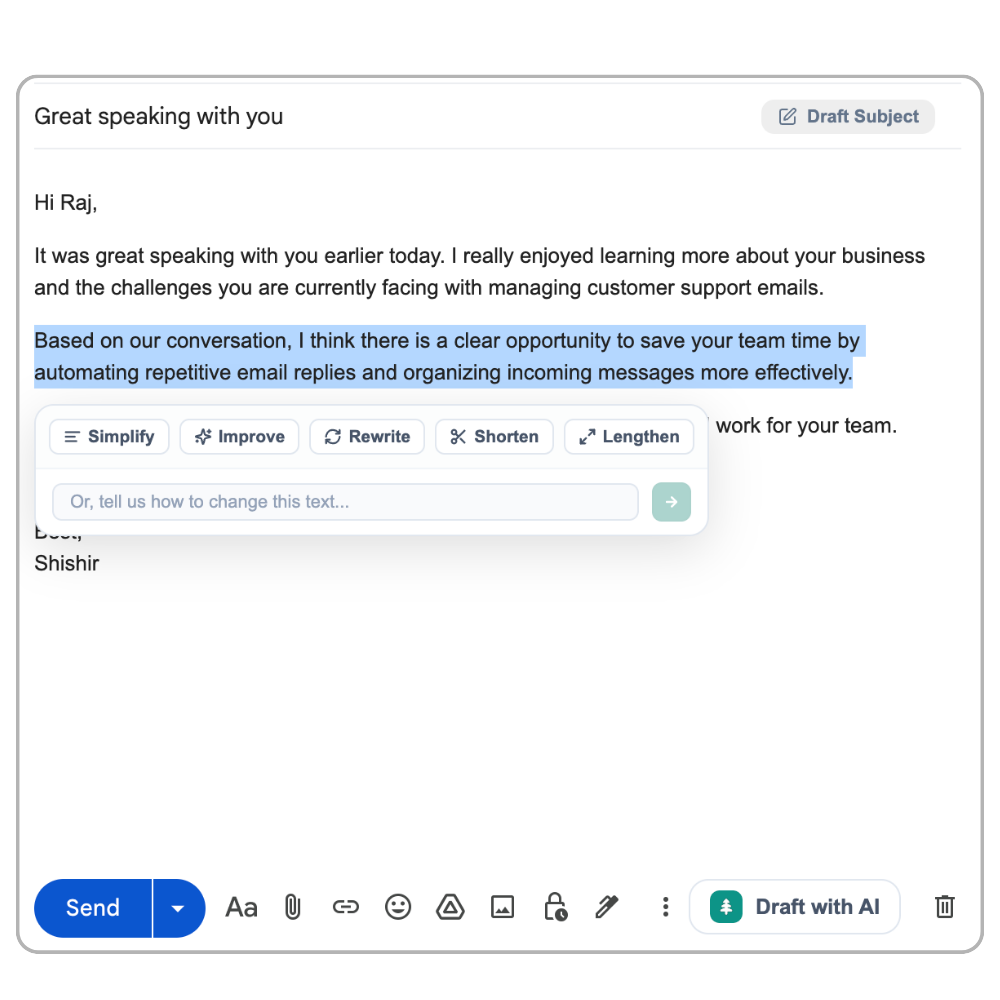
Foresty lets you highlight a sentence or an entire email and improve it inline, better tone, cleaner grammar, shorter structure. It all happens in the compose window.
With ChatGPT, you paste your draft in, ask for improvements, copy the revised version back, and swap it into your email. It works, but the friction is real.
Writing Subject Lines
Foresty has a dedicated subject line generator that creates options based on your email content automatically.
ChatGPT can generate subject lines too, but only if you ask it explicitly with a prompt. It's an extra step that most people skip.
Smart Autocomplete While Typing
Foresty predicts and completes your sentences in real time as you type inside Gmail or Outlook. It adapts to your writing style and the context of the email.
ChatGPT has no autocomplete feature. It generates on demand, not in real time.
Voice Input
Both tools offer voice input. Foresty's voice assistant works inside your inbox. You speak, it writes the email. No switching tabs required.
ChatGPT's voice conversations feature is useful but designed for chat, not for composing emails inside your inbox.
Working Inside Your Inbox
This is the single biggest practical difference.
Foresty runs as a Chrome extension embedded directly in Gmail and Outlook. You never leave your inbox. There's no tab management, no copy-pasting, no context switching.
ChatGPT is a separate web application. Using it for email always means working across at least two browser tabs.
Time Comparison: How Long Does Each Tool Actually Take?
Numbers matter here. Here's how the time breaks down across common email tasks:
| Task | Manual | ChatGPT | Foresty |
|---|---|---|---|
| Drafting a new email | 20 to 30 mins | 10 to 15 mins | 2 to 3 mins |
| Generating a reply | 10 to 20 mins | 5 to 10 mins | 30 to 60 secs |
| Improving a draft | 5 to 10 mins | 3 to 5 mins | Under 1 min |
| Writing a subject line | 2 to 5 mins | 2 to 3 mins | Instant |
| Overall effort required | Very High | Medium | Minimal |
If you send 10 to 20 emails a day, the difference between ChatGPT and Foresty can add up to an hour or more of reclaimed time per week.
Pros and Cons
Foresty
- Works directly inside Gmail and Outlook
- No tab switching or copy-pasting
- Reads email thread context automatically
- Smart autocomplete as you type
- Voice assistant built in
- Privacy-focused, email content never stored
- Affordable plans starting at $8.08/month
- Focused on email only, not a general assistant
- Requires Chrome browser
- Word-based monthly limits on all plans
- Free plan limited to 500 words/month
ChatGPT
- Extremely versatile, works for any writing task
- Strong writing quality
- Large free plan available
- Great for brainstorming and research
- Works across many platforms
- Widely recognised and trusted
- Requires leaving your inbox every time
- No Gmail or Outlook integration
- You must manually paste email context
- No autocomplete feature
- More steps per email = more friction
- Paid plan starts at $20/month
Which Tool Is Best For You?
Choose Foresty if you:
- ✓Spend a meaningful portion of your day in Gmail or Outlook
- ✓Want to reply faster without thinking too hard about every message
- ✓Handle repeat or similar email types (follow-ups, client updates, replies to requests)
- ✓Want a tool that stays inside your inbox with zero tab switching
- ✓Are looking for an affordable email-specific plan
The Gmail writing assistant and Outlook writing assistant are worth exploring if you use either platform daily.
Choose ChatGPT if you:
- ✓Use AI for many different tasks beyond email
- ✓Write long-form content, do research, or need brainstorming help
- ✓Only send a small number of emails per day
- ✓Are already on a ChatGPT Plus plan for other reasons
- ✓Need a general-purpose AI assistant for work beyond your inbox
There's also nothing stopping you from using both, Foresty for inbox speed, ChatGPT for everything else.
Pricing Comparison
Foresty Pricing
| Plan | Monthly Price | Annual Price | Words/Month |
|---|---|---|---|
| Free | $0 | $0 | 500 words |
| Basic | $12.95/month | $8.08/month ($97/year) | 15,000 words |
| Pro | $29.95/month | $21.41/month ($257/year) | 50,000 words |
All plans include Gmail and Outlook integration, draft composition, voice assistant, reply generation, writing improvement, and smart autocomplete. You can start on the free plan with no credit card required. See the full breakdown on the Foresty pricing page.
ChatGPT Pricing
| Plan | Price |
|---|---|
| Free | $0 |
| Plus | $20/month |
| Team | $25 to $30/user/month |
| Enterprise | Custom |
ChatGPT's free plan is generous for general use. But for dedicated email productivity, Foresty's Basic plan at $8.08/month (billed annually) is notably more affordable and purpose-built for inbox work.
Final Verdict
ChatGPT is a capable writing tool. If you use it for emails alongside research, writing, and other daily tasks, it makes sense to keep it in your workflow.
But if email is where a large part of your day goes, ChatGPT's biggest problem is that it requires you to leave your inbox every single time. That extra friction, switching tabs, pasting context, copying results, might seem minor, but it compounds across dozens of emails a week.
Foresty removes that friction entirely. It lives inside Gmail and Outlook, understands your threads, and helps you reply or draft without any of the back-and-forth. For email-heavy professionals, recruiters, sales reps, account managers, founders, that's a meaningful difference in how a workday feels.
If you want a general AI assistant, ChatGPT is a solid choice. If you want to get through your inbox faster without the extra steps, Foresty is worth trying, and you can start for free.
FAQ
Is Foresty better than ChatGPT for writing emails?
For email specifically, yes. Foresty works directly inside Gmail and Outlook, reads your thread automatically, and generates replies in 30 to 60 seconds. ChatGPT requires tab switching and manual copy-pasting, which adds several minutes to every email.
Can ChatGPT write emails directly inside Gmail or Outlook?
No. ChatGPT is a separate web application. To use it for email, you need to open a new tab, paste your email context, generate the text, and bring it back into your inbox manually.
Does Foresty store or read my emails?
Foresty only accesses the email content you're actively working on, and only when you trigger a feature. Email content is never permanently stored, never used for model training, and never sold. It's processed temporarily and discarded after your request is completed.
Is Foresty free to use?
Yes. Foresty has a free plan that includes 500 words per month and access to all core features, drafting, replies, grammar improvement, and autocomplete. No credit card is required to start.
What's the main difference between Foresty and ChatGPT for email?
The workflow. Foresty is embedded in your inbox. ChatGPT is a separate tool. That difference determines how many steps you take per email and how much time you spend outside your inbox.
Which tool is better for high-volume email users?
Foresty. If you're sending 10 to 20+ emails a day, the time saved by working inside your inbox, versus switching tabs for every message, is significant. The Basic plan at $8.08/month covers 15,000 words per month, which handles most professional workloads.
Can I use Foresty with Outlook, not just Gmail?
Yes. Foresty works with both Gmail and Microsoft Outlook, including Outlook 365 and Outlook Web. The Outlook writing assistant has the same features as the Gmail version.
Do I need to use one or the other, or can I use both?
You can absolutely use both. Many people use Foresty for fast inbox replies and keep ChatGPT for larger writing projects, research, or brainstorming. They serve different purposes and work well together.